
Traffic Protection
Merchants can ask BR-DGE to activate this free feature on one or more retail channels in order to maintain the uninterrupted flow of payments in case of PSP outage.
About Traffic Protection
PSP outages can result in a number of modes of failure; some result in failed transactions impacting conversion and revenue, others failover to a secondary PSP but still incur PSP transaction fees, added latency, and a poor customer experience.
Traffic Protection offers an optional way to prevent PSP failure losing you revenue. If you opt in to Traffic Protection, with Smart Routing in place, you are protected from losing revenue, and realise all the benefits detailed below.
Benefits of activating Traffic Protection
- Saves revenue and conversion: When a PSP fails, transactions keep completing instead of failing outright.
- Less risk: Requires no changes to your routing rules by your operations team.
- Fast response time: PSP traffic is rapidly rerouted, instead of your operations team monitoring, spotting the issue, verifying the issue, and then amending rules appropriately.
- Access to incident information: Every opt-in change, disablement, and re-enablement is logged and kept for at least two weeks, so BR-DGE can always show you exactly what happened, and when.
How it works
When a total PSP failure happens or traffic drops below a set threshold, 24/7 Customer Support are automatically alerted to a critical incident and they activate traffic protection for your failed PSP.
Transactions that are mid-flight when a PSP is disabled are allowed to complete or time out gracefully. All new transactions are routed to the alternative PSP, as defined by your routing rules.
Customer Support contacts affected merchants via the BR-DGE status page. When the failed PSP recovers, Customer Support reverts the changes made. The Support team monitors the transactions after recovery and informs you via the status page.
Traffic Protection has been designed to minimise false positives by ignoring minor, or temporary degradations, or low-volume transaction windows.
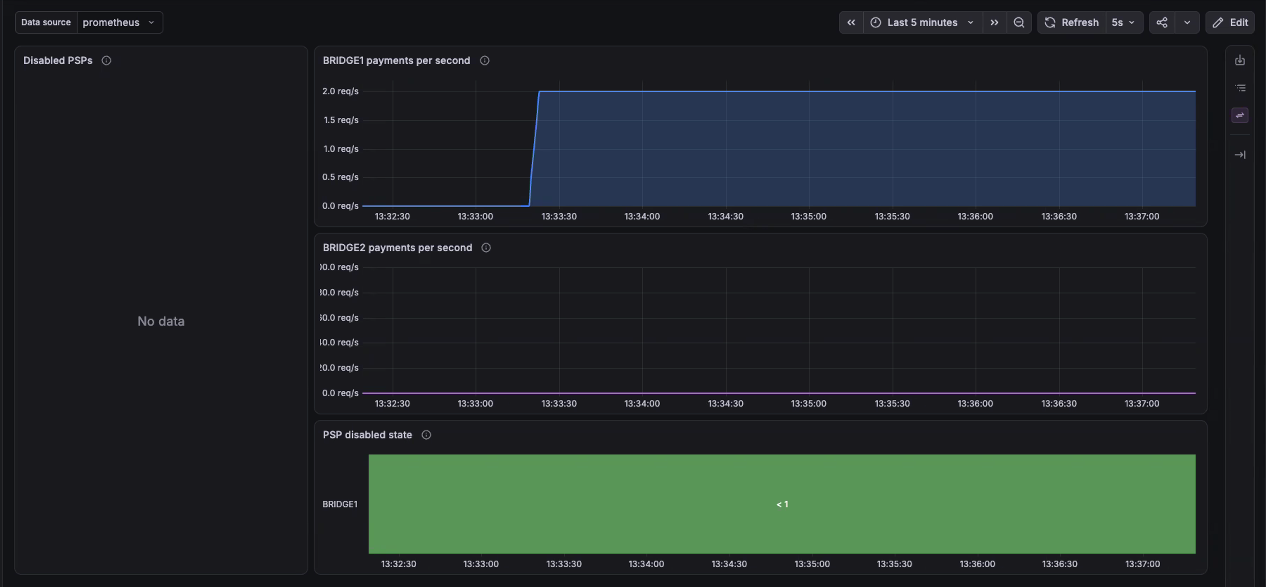
The images below show PSPs 1 and 2 running on a sandbox to illustrate what happens when Traffic Protection is enabled.
This first image illustrates traffic flowing normally through PSP BRIDGE1:
This second image shows what happens when PSP BRIDGE1 fails and Traffic Protection is activated to switch the traffic flow to PSP BRIDGE2. You can see how traffic ceases immediately for BRIDGE1 and starts on BRIDGE2:
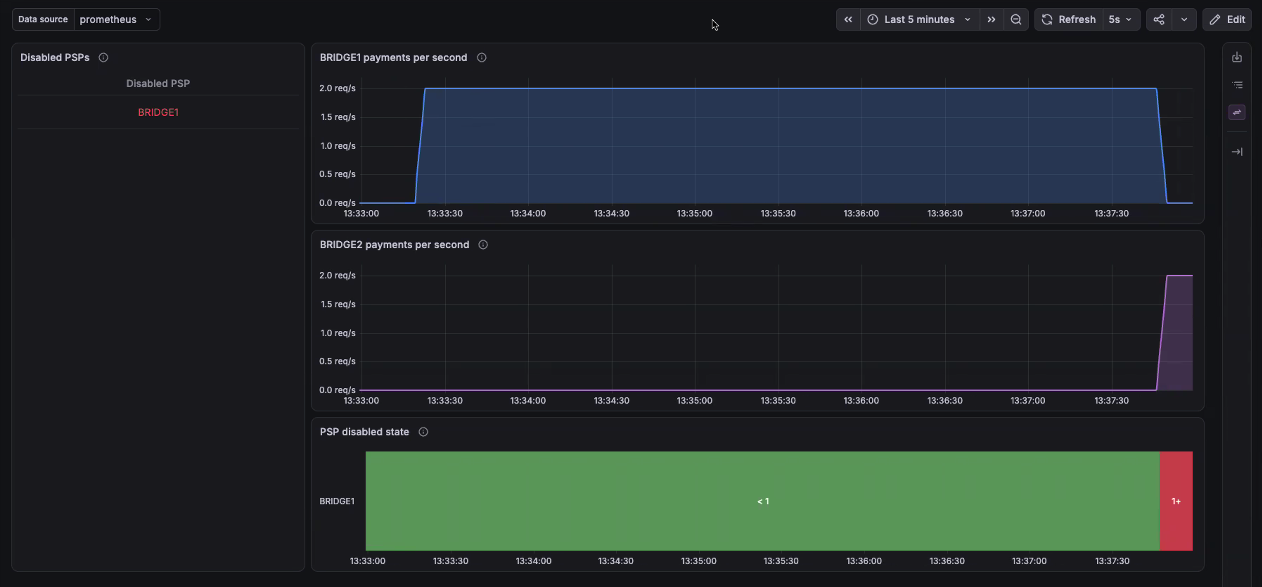
When BRIDGE1 recovers, Traffic Protection switches traffic back to BRIDGE1. Smart routing rules are respected both during and after Traffic Protection is enabled.
Important:It is the merchant's responsibity to ensure that the routing rule setup provides appropriate failover in case of a PSP outage. Contact Customer Support with any queries or for assistance.
How to get Traffic Protection
Contact Customer Support and ask for Traffic Protection.
Updated 20 days ago