
Guidelines for using Rules
How best to implement Smart Routing rules.
How Smart Routing works
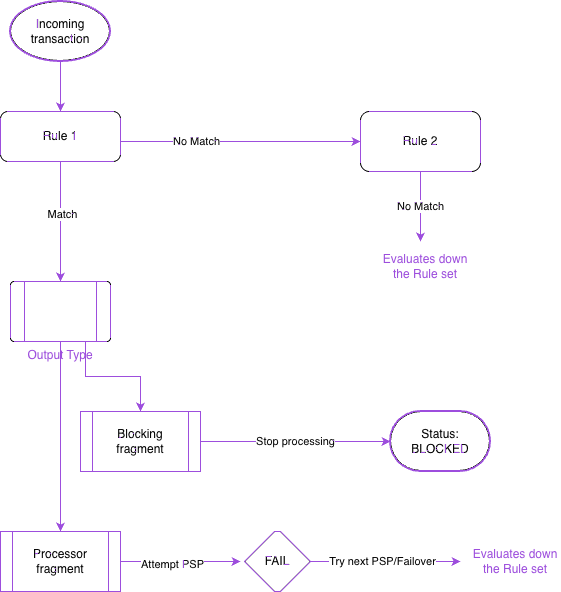
BR-DGE Smart Routing enables you to use a combination of different fragment types to build Rules and Rule sets. When processing a payment or payout, the BR-DGE routing engine checks your Rule Set from top to bottom, evaluating the rules in numerical order. It selects the first matching rule that it finds and executes the associated output fragment as shown below.
📜 Rules & Rule Sets
- Rule: A rule consists of one, or more input fragments (the conditions), and a single output fragment (the action/destination). A rule determines what happens to a transaction when it matches your criteria.
- Rule set: A rule set is the collective name for all the individual rules assigned to a single retail channel. Rule sets can be found in the Smart Routing tab of the BR-DGE portal.
- When creating new rules, we strongly recommend that you change New rule to a meaningful name so that future management of your rules is easier.
- Rules go live within 10 minutes of saving.
🔀 Initial transaction attempt
- Top-down logic: Rules are assessed top to bottom. The system stops evaluating the rest of the Rule Set as soon as it finds the first rule where all input conditions are met.
- Ordering is critical: Because rules are evaluated sequentially, a rule with a blocking fragment may be placed at any point within a rule set. If a blocking rule is placed below a standard routing rule that matches the same criteria, the transaction is sent to the PSP rather than being blocked. Always ensure your high-priority restrictions sit at the top of your Rule Set.
🔄 Transaction failover events
- For routing outputs: If a payment fails with the initial PSP, that processor is removed from consideration. The routing engine automatically attempts to retry the payment with the next suitable processor in your priority list or volume split. If no other processors are defined in that fragment, it re-checks the remaining Rule Set for another match. If there are no other suitable rules for your transaction, the transaction is declined with the latest available response code.
- For blocking outputs: Failover logic does not apply. Once a block rule is triggered, the engine stops completely, skipping all PSP communication and failover evaluation.
🛡 The "All" Safety Net
If a transaction does not match any rules in your Rule Set, it is declined automatically. To prevent accidental declines due to misconfiguration, we highly recommend adding a safety net rule at the very end of your list.
💡 Tip: If you leave the Rule Inputs section blank when creating a rule, BR-DGE automatically populates an All Input fragment, which matches 100% of remaining transactions and directs them to a baseline processor.
Troubleshooting
To investigate transaction behaviour, go to the Transaction History.
Updated 3 months ago