
Blocking rule examples
Some examples of common situations where you may want to use a blocking fragment. All examples use the Payments Rules tab.
Example 1: Blocking transactions from a single high-risk country
Goal: To comply with a new regulatory obligation by preventing all card-based transactions using cards issued in country Norwick Bay.
Do the following:
- Log into the BR-DGE Portal as an administrator and navigate to the Smart Routing tab.
- Select Create Rule.
- Name the rule AML Block - Norwick Bay.
- In Rule Configuration, select Add Rule Input > BIN Metadata and set the Issuing country to NB.
- Select Create Fragment.
- Select Add Rule Output.
- Select Block Fragment, then select Create Fragment.
- Select Save Rule.
- Select Reorder Rules and move this rule to the top of the list.
What happens when a transaction is attempted:
- The transaction attempt from the Norwick Bay-issued card is immediately blocked by the BR-DGE system before it is routed to any PSP.
- A 4805 error code is returned, and the transaction is not routed to any PSP.
- The rule which triggered the block is recorded in logging.

Example 2: Blocking business or commercial cards
Goal: To mitigate corporate fraud risk by preventing all transactions made using commercial or business-issued cards, as these have been identified as a high-risk category in recent fraud trends.
Do the following:
- Log into the BR-DGE Portal as an administrator and navigate to the Smart Routing tab.
- Select Create Rule.
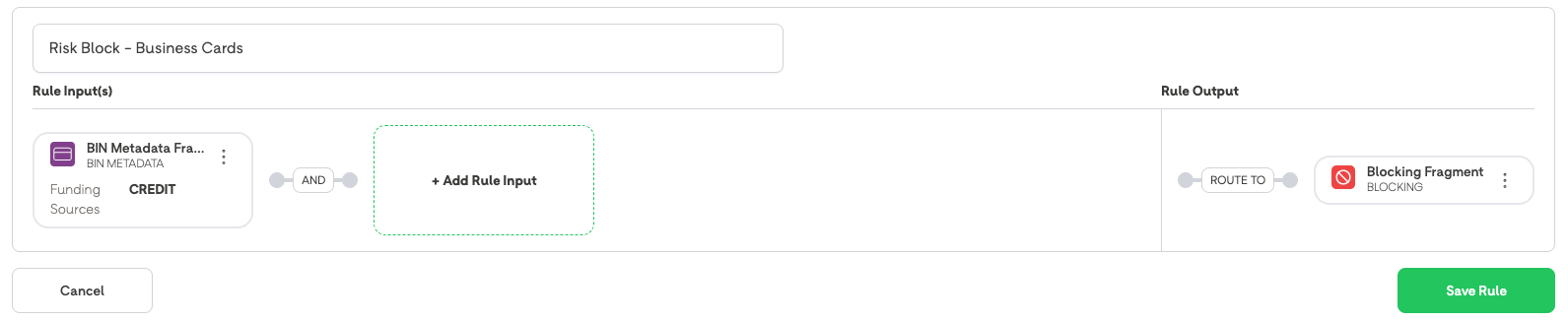
- Name the rule Risk Block - Business Cards.
- In Rule Configuration, select: Add Rule Input > BIN Metadata.
- For BIN Metadata, set Commercial Card to: Yes.
- Select Create Fragment.
- Select Add Rule Output.
- Select Block Fragment, then select Create Fragment.
- Select Save Rule.
- Select Reorder Rules and move this rule to the top of the list.
What happens when a transaction is attempted using a card identified by the BIN lookup as a Business/Commercial card:
- The transaction attempt is immediately blocked by the BR-DGE system before being routed to any PSP.
- The system returns the 4805 error code indicating a block by configured rules.
- The rule which triggered the block is recorded in logging.
Example 3: Allowing credit cards only in Northern Ireland (whitelisting)
Goal: To comply with regional UK regulations that allow credit card where the user was located in Northern Ireland (NI) at the time of transaction to be routed to a PSP, while blocking them everywhere else in the UK. This requires a whitelisting approach where the more specific "Allow" rule sits above the general "Block" rule.
Prerequisite: The merchant must be sending the user's geographical location in the custom_metadata object during the transaction request (example: Key: user_location, Value: Northern Ireland or UK).
Do the following having logged into the BR-DGE Portal and navigated to Smart Routing:
Rule 1 (Whitelisting/Allow):
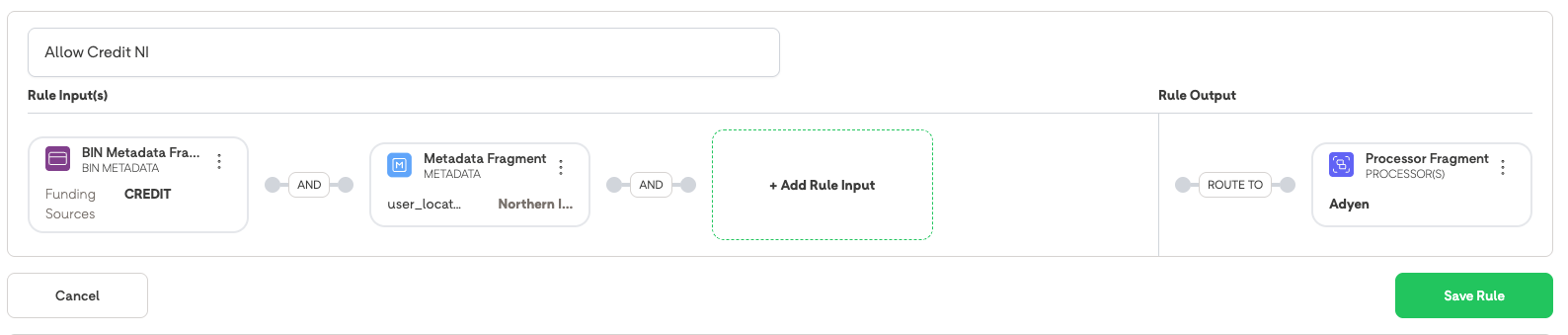
- Select Create Rule and name it Allow Credit NI.
- In Rule Configuration, select Add Rule Input > BIN Metadata. Set the Funding Source to: Credit.
- Select Add Rule Input > Metadata. Set the Key to: user_location and the Value to: Northern Ireland.
After entering Key field and Value pairs press ENTER to continue.
- Select Add Rule Output and select a standard Routing Fragment directing to a valid PSP, for example, PSP_A.
- Select Save Rule.
Rule 2 (Blocking/Catch-All UK - Lower Priority):
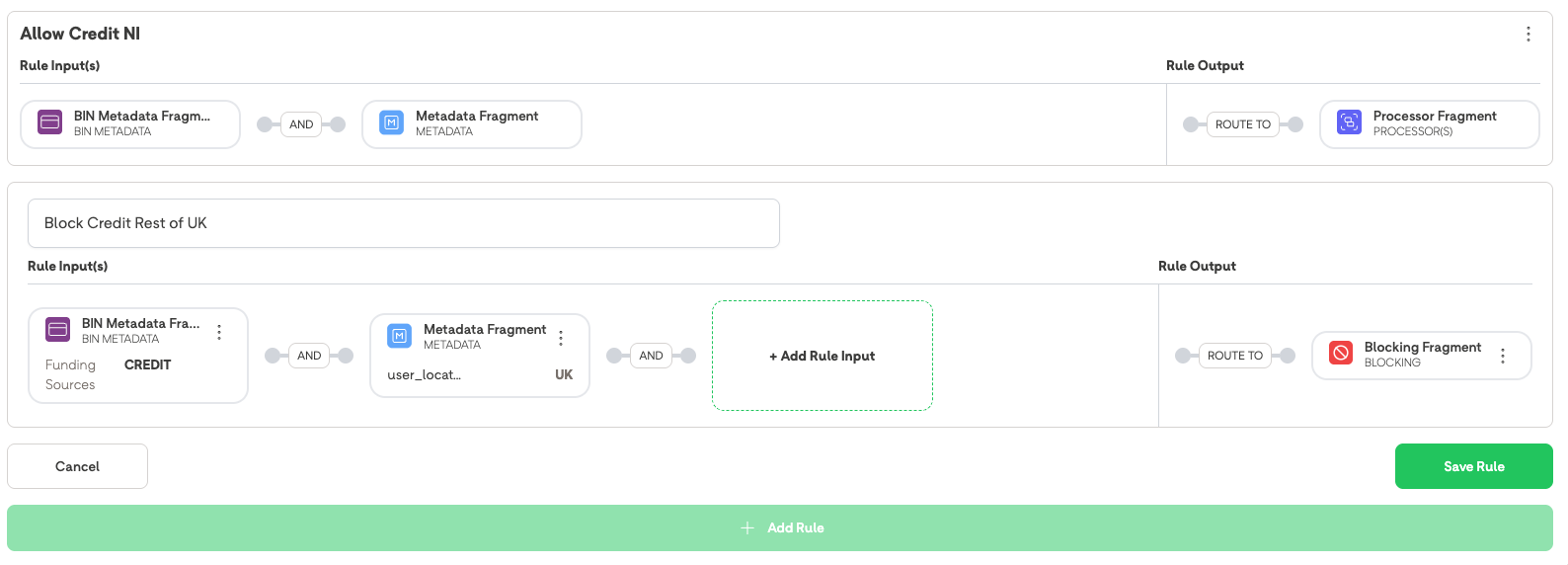
6. Select Create Rule and name it Block Credit Rest of UK.
7. In Rule Configuration, select Add Rule Input > BIN Metadata. Set the Card Category to: Credit.
8 . Select Add Rule Input > Metadata. Set the Key to: user_location and the Value to: UK.
After entering Key field and Value pairs press ENTER to continue.
- Select Add Rule Output and select the Block Fragment > Create Fragment.
- Select Save Rule.
- Confirm that Rule 1 is positioned above Rule 2 in the Smart Routing list.
What happens when a transaction is attempted with a Credit Card and user_location: England.
- A credit card transaction with user_location: Northern Ireland is successfully routed to the PSP.
- A credit card transaction with any other user_location: UK (e.g. England, Scotland, Wales) is immediately blocked by Rule 2.
Example 4: Blocking prepaid cards
Goal: To reduce exposure to risk associated with unverified or non-KYC-compliant funds by preventing all transactions made using prepaid cards.
- Log into the BR-DGE Portal and navigate to Smart Routing.
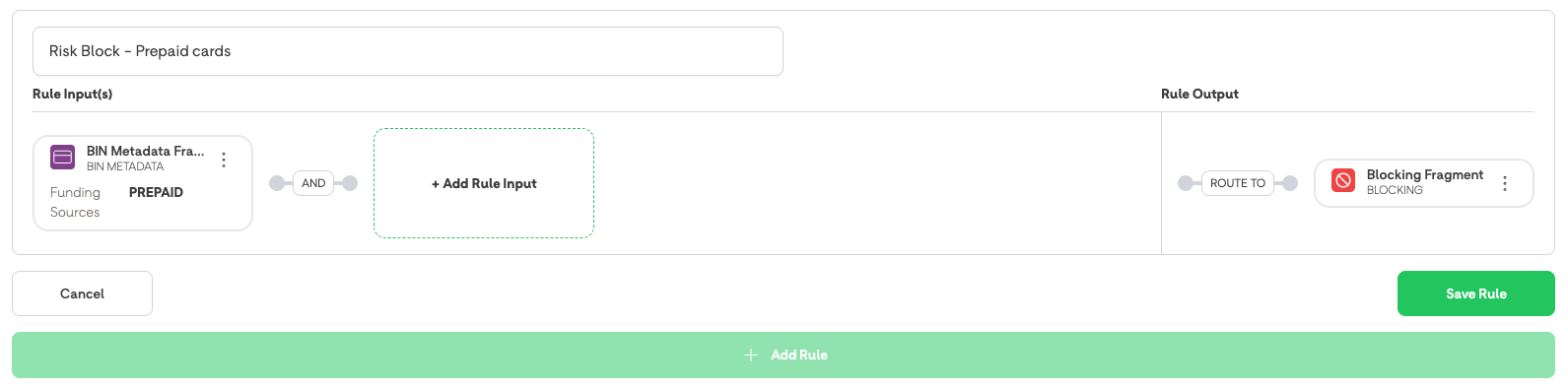
- Select Create Rule and name the rule Risk Block - Prepaid Cards.
- In Rule Configuration, select Add Rule Input > BIN Metadata.
- Under BIN Metadata, set the Funding Source to: Prepaid.
- Select Create Fragment.
- Select Add Rule Output.
- Select the Block Fragment > Create Fragment.
- Select Save Rule.
- Select Reorder Rules and move this rule to the top of the list.
What happens when a test transaction is attempted using a card identified by the BIN lookup as Prepaid:
- The transaction attempt is immediately blocked by the BR-DGE system before being routed to any PSP.
- The system returns a 4805 error code and payment/payout status indicating a block by configured rules.
- The rule which triggered the block is recorded in logging.
Example 5: Blocking all NON-UK cards (default block)
Goal: To enforce a high-level AML block that prevents any transaction from being processed unless the card was issued in the UK (GB or UK). This requires updating existing allow rules and creating a catch-all block at the bottom of the Rule Set.
- Log into the BR-DGE Portal and navigate to Smart Routing.
- Update Existing Rules (Whitelisting):
- Go through ALL existing, active Smart Routing rules that are designed to allow transactions.
- For each existing rule, select Add Rule Input > BIN Metadata.
- Under BIN Metadata, set the Country of Issue to: GB (or UK).
- Save the changes for all existing rules. (This ensures only UK-issued cards meet the criteria for existing successful routing paths).
- Create Catch-All Block Rule:
- Select Create Rule.
- Name the rule AML Block - Catch All Non-UK.
- Do NOT add any rule input.
- Select Add Rule Output.
- Select the Block Fragment > Create Fragment.
- Select Save Rule.
- Ensure the new Catch-All Block rule is placed at the very bottom of the rule list.
What happens when a transaction is attempted using a card issued in France (FR):
- A non-UK card is processed. It fails the criteria of all the new, restrictive UK-only rules, falls through to the final Catch-All Block rule, and is immediately blocked.
- A UK card (GB-issued) is processed. It meets the new criteria on an existing rule and is successfully routed to the intended PSP.
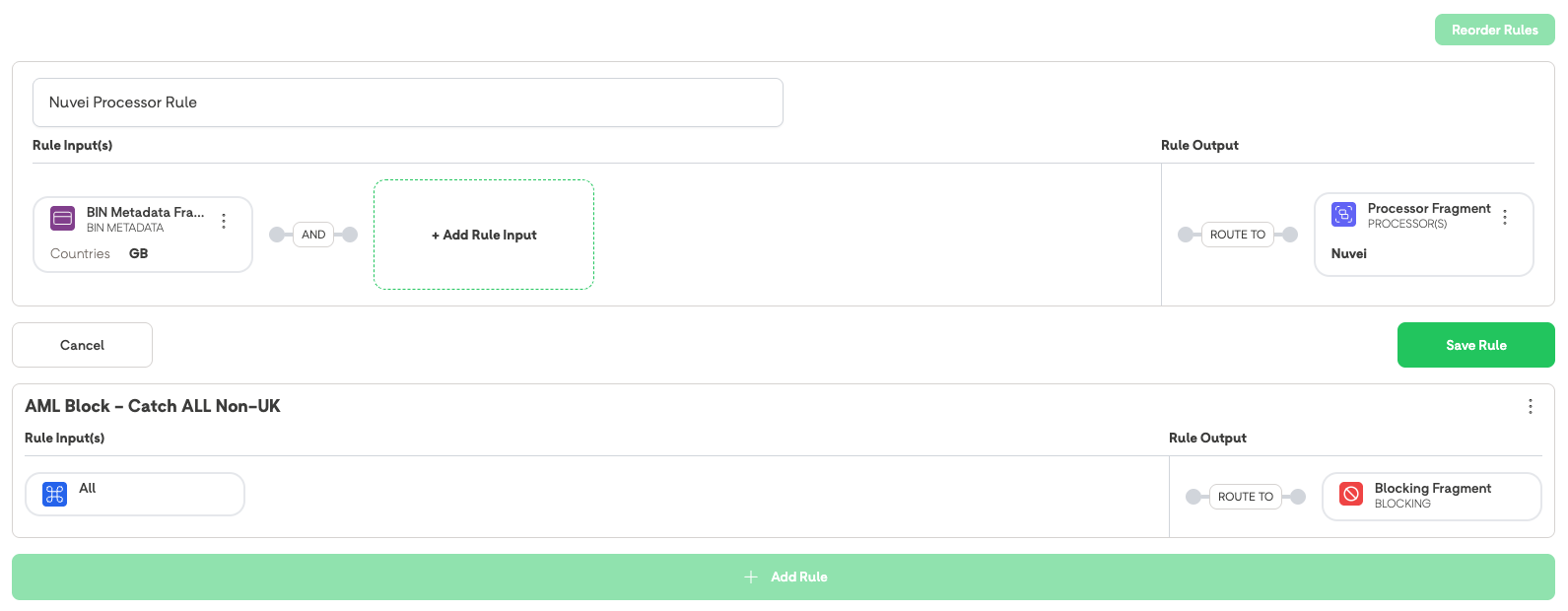
Example 6: BIN Lookup failure
Goal: To ensure that a failure in the external BIN lookup service does not result in a hard decline for customers, even if a blocking rule based on BIN metadata exists.
Prerequisite: A “Catch-All” rule at the bottom of the ruleset to route all payments that don’t match other rules to be processed through two prioritised PSPs.
- Create an active rule: Block Prepaid Cards (Input: BIN Metadata > Funding Source: Prepaid | Output: Block Fragment).
What happens when a customer attempts a transaction with a card that would typically be identified as "Prepaid":
- The BR-DGE routing engine attempts to call the BIN lookup service to identify the card attributes.
- The BIN lookup service fails (example: timeout, service down, or BIN not found in the database).
- Because the system cannot confirm the card is Prepaid, the specific blocking rule criteria are not met.
- The routing engine follows the current logic and processes the transaction with the data available.
- The transaction "falls through" the Block rule and hits the next valid Routing Rule (the Catch-All rule).
- Transaction is routed to the PSP(s) in the Catch-All rule.
Summary:
- The transaction is not blocked by the Block Prepaid Cards rule because the specific metadata (Prepaid) could not be verified.
- The system prioritises availability/conversion over blocking when data is missing.
- The transaction is successfully routed to a PSP based on the remaining available criteria
- The transaction record in the Portal shows that it was processed, though BIN metadata fields may be empty or marked as Unknown.
- The failed lookup is logged so that we can keep track of how often this occurs.
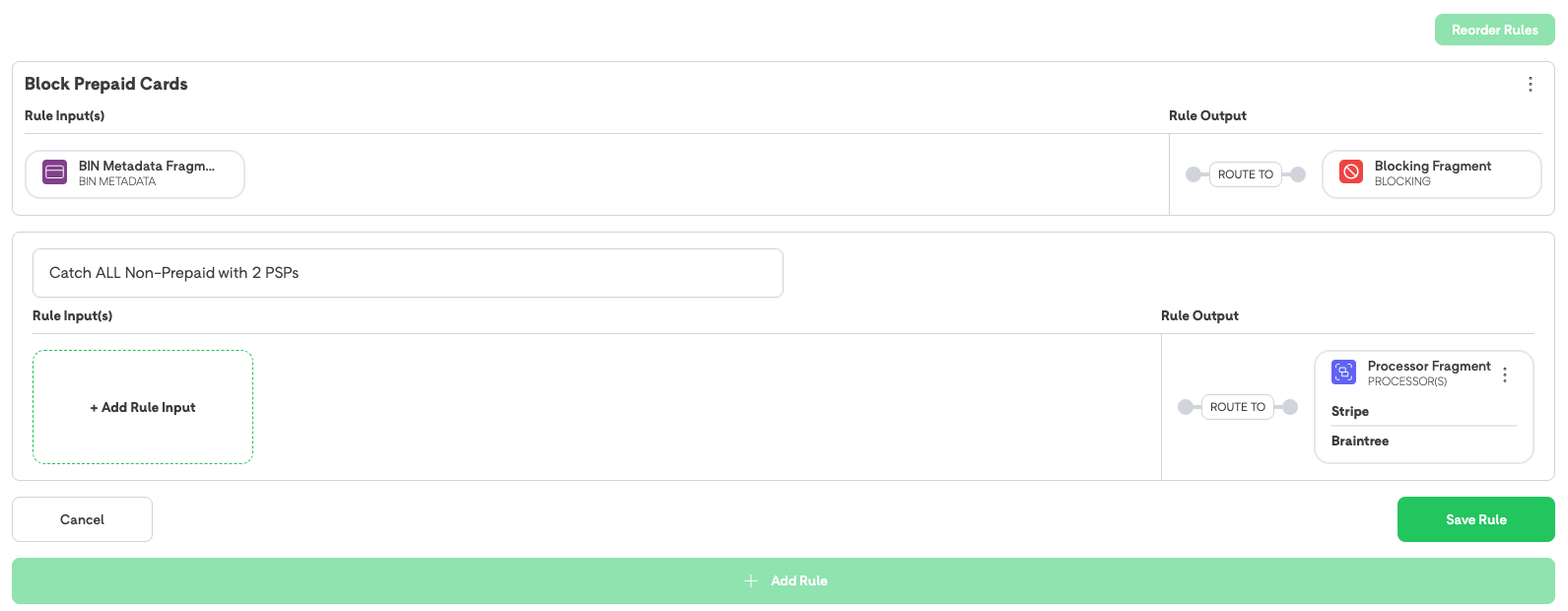
Example 7: Routing commercial cards to a dedicated PSP
Goal: To optimise processing costs by routing all commercial/business-issued cards to a specific PSP, while allowing standard consumer cards to follow other routing logic.
- Log into the BR-DGE Portal as an administrator and navigate to the Smart Routing tab.
- Select Create Rule.
- Name the rule Route Commercial Cards - PSP_B.
- In Rule Configuration, selects Add Rule Input > BIN Metadata.
- Under BIN Metadata, set the Commercial option to: Yes.
- Select Create Fragment.
- Select Add Rule Output.
- Select a Processor Priority Fragment and chooses PSP_B as the destination.
- Select Save Rule.
- Move this rule to the top of the rule list (or above standard consumer card routing rules) to ensure commercial cards are evaluated first.
What happens when a transaction is attempted using a card identified by the BIN lookup as a Commercial card:
- The transaction is routed to PSP_B.
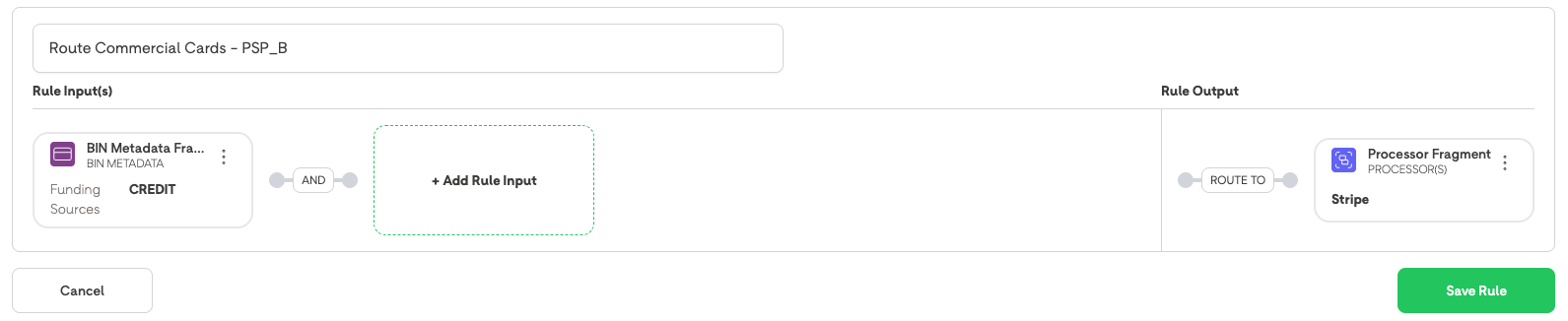
Example 8: Multi-rule blocking for country and commercial cards
Goal: To enforce regulatory and risk policies simultaneously - blocking cards from a sanctioned region (example: Norwick Bay) and cards identified as corporate while ensuring legitimate traffic is routed to a PSP.
- Log into the BR-DGE Portal as an administrator and navigate to the Smart Routing tab.
- Rule 1 (Sanctions): Create a rule named AML Block - Norwick bay.
Input: BIN Metadata > Country of Issue: NB.
Output: Block Fragment. - Rule 2 (Commercial Risk): Create a rule named Risk Block - Corporate Cards.
Input: BIN Metadata > Commercial Card: Yes
Output: Block Fragment. - Rule 3 (Routing legitimate cards): Create a rule named Routing - all other cards.
Input: All i.e. do not choose any input fragment
Output: Route to PSP - Confirm that both blocking rules are positioned at the top of the routing list, ensuring they are evaluated before any other routing rules.
Try these test transactions and check the results:
Test A:
A transaction is attempted with a consumer (non-commercial) card issued in Norwick Bay.
Results A:
The transaction matches Rule 1 and is immediately blocked. Evaluation stops before reaching Rule 2 or the PSP routing rules.
The system returns the specific block error code and logs the name of the rule that triggered the block for audit purposes.
Test B:
A transaction is attempted with a UK issued commercial card.
Results B:
The transaction does not match Rule 1, matches Rule 2, and is immediately blocked.
The system returns the specific block error code and logs the name of the rule that triggered the block for audit purposes.
Test C (Happy Path):
A transaction is attempted with a UK issued consumer (non-commercial) card.
Result C:
The transaction fails to match Rule 1 and Rule 2, "falls through" to the next valid rule 3, and is successfully routed to the designated PSP.
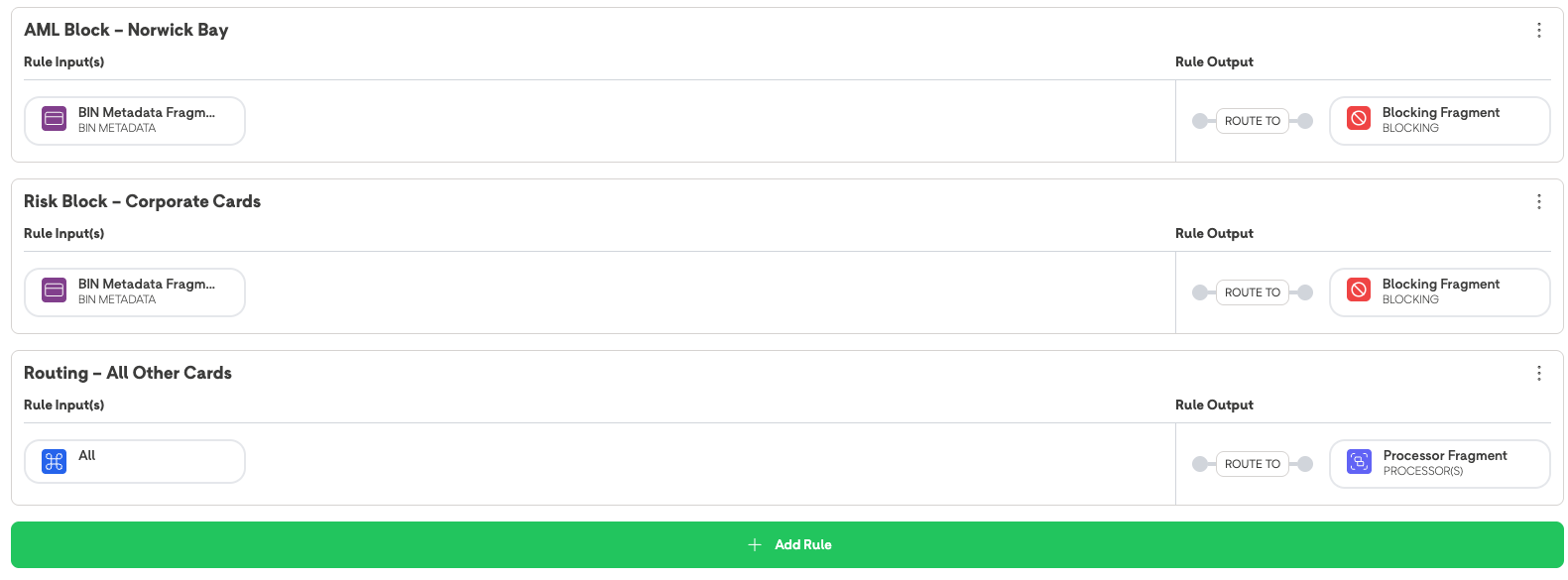
Example 9: Geographic payment acceptance (credit cards in RSA only)
Goal: To allow credit card payments specifically for the South African (RSA) market while blocking credit card traffic from all other regions and ensuring non-credit cards route normally.
Do the following:
- Log into the BR-DGE Portal as an administrator and navigate to the Smart Routing tab.
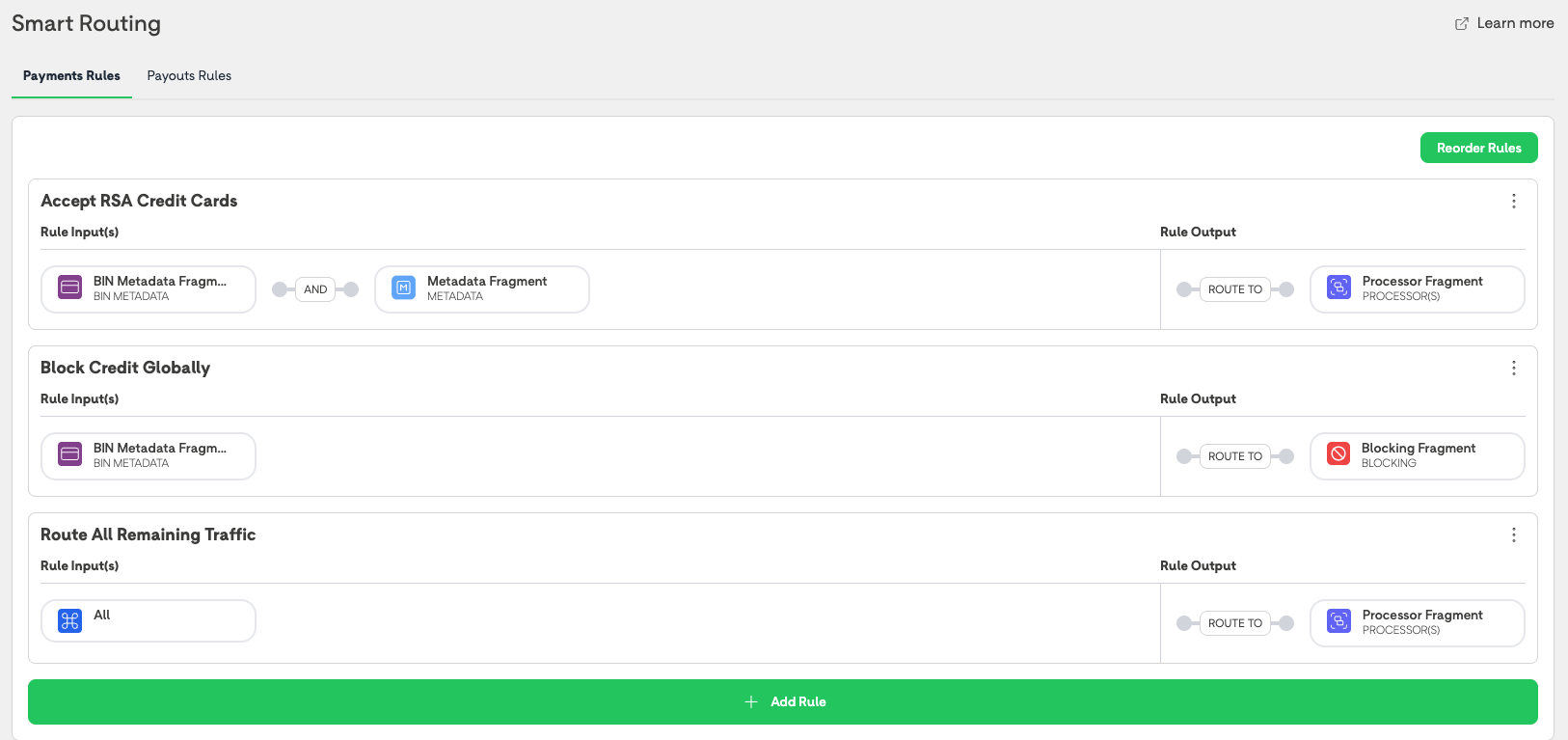
- Rule 1 (Regional Exception): Create a rule named Accept RSA Credit Cards.
- Input: BIN Metadata > Funding Source: Credit AND Custom Metadata: Key:Location Value:RSA.
After entering Key field and Value pairs press ENTER to continue.
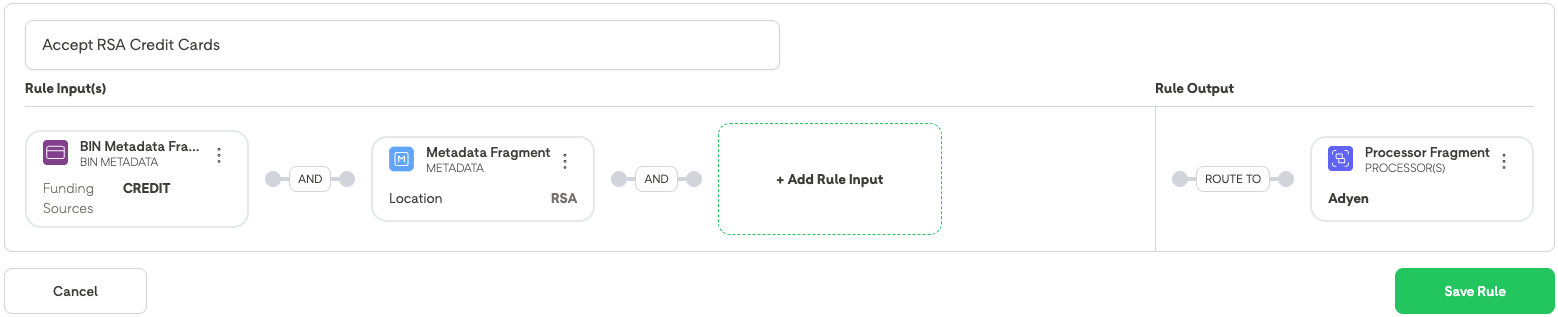
- Output: Route to RSA specific PSP.
- Rule 2 (Global Credit Restriction): Create a rule named Block Credit Globally.
- Input: BIN Metadata > Funding Source: Credit.
- Output: Block Fragment.
- Rule 3 (All Other Traffic): Create a rule named Route All Remaining Traffic.
- Input: All i.e. do not choose ANY input fragment
- Output: Route to Primary PSP.
- Confirms the priority ordering: The RSA Exception (Rule 1) is at the top, followed by the Global Block (Rule 2), ensuring the exception is evaluated before the general restriction, and having the safety net of a total block on credit cards before rule 3 is evaluated.
Try these test transactions and check the results:
Test A:
A transaction is attempted with a Credit card with custom metadata indicating a location of RSA.
Result A (Credit in RSA):
The transaction matches Rule 1 and is successfully routed to the RSA PSP.
Test B:
A transaction is attempted with a Credit card with custom metadata indicating a location of UK.
Result B (Global Block):
The transaction fails to match Rule 1, matches the criteria for Rule 2, and is immediately blocked.
The system returns the specific block error code and logs the name of the rule that triggered the block for audit purposes.
Test C:
A transaction is attempted with a Debit card with custom metadata indication a location of UK.
Result C (General Traffic):
The transaction fails Rule 1 and Rule 2, falls through to Rule 3, and is routed to the Primary PSP.
Example 10: Handling of Unknown status (non-retryable)
Goal: To ensure that if a transaction attempts routing to a PSP and results in an "Unknown" status (example: a timeout where the final state is unconfirmed), the system does not incorrectly fail over to a subsequent blocking rule, which would overwrite the critical "Unknown" state with a "Blocked" status.
Do the following:
- Log into the BR-DGE Portal as an administrator and navigate to the Smart Routing tab.
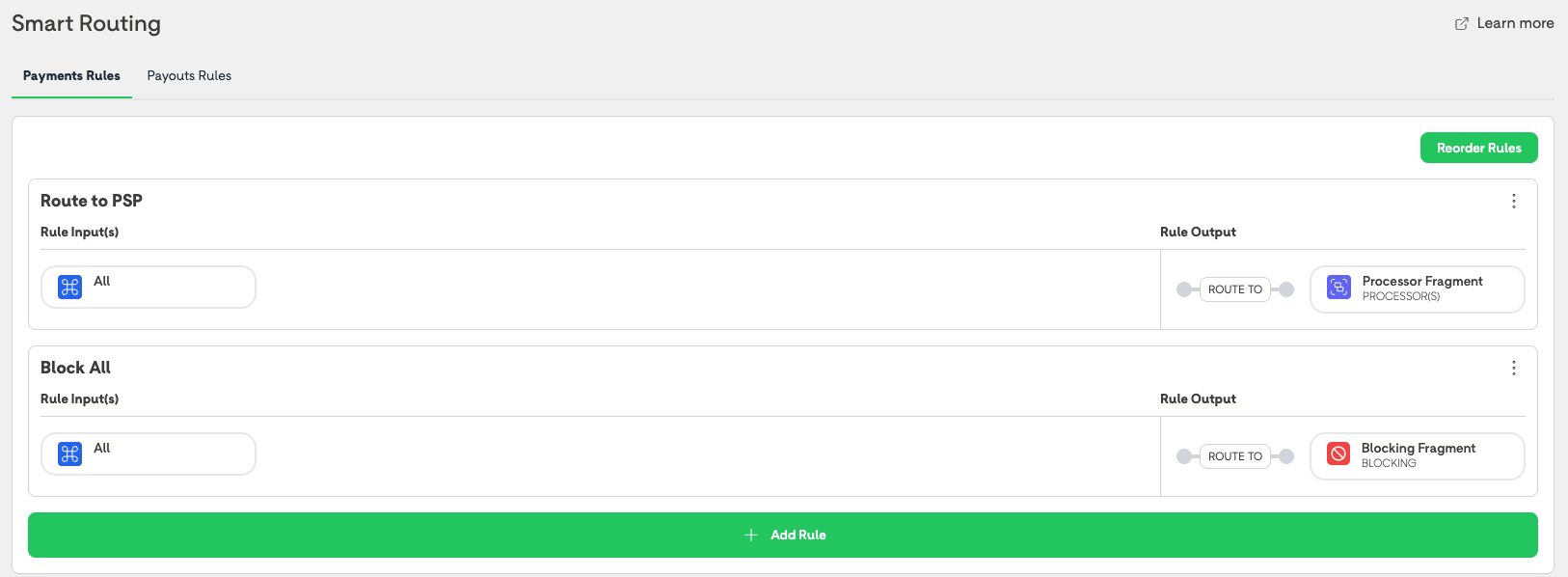
- Rule 1 (Primary Routing): Create a rule named Route to PSP.
- Input: All i.e do not choose ANY Input fragment.
- Output: Route to PSP 1
- Rule 2 (Safety Block): Create a rule named Block All.
- Input: All i.e do not choose ANY Input fragment.
- Output: Block Fragment.
- Ensure that Rule 1 is at the top, acting as the primary path.
Try these test transactions and check the results:
Test A:
A transaction is initiated. It matches Rule 1 and is sent to PSP 1.
During processing, PSP 1 experiences a timeout. The system cannot confirm if the payment was successful or failed, resulting in an UNKNOWN status.
Results A:
BR-DGE treats the Unknown status as non retry-able for this routing attempt. Therefore Smart Routing does not evaluate Rule 2, and routing for this transaction terminates.
Updated 4 months ago