
Issuer Routing example
An example of routing to a specific issuer. Routing at the issuer level lets you direct transactions from specific banks to your best performing processor for that issuer, a straightforward way to lift authorisation rates without touching your integration.
Example 1: Routing to a specific issuer
Goal: To maximise cost reduction, direct transactions from a bank to PSP A, using PSP B as a backup.
Do the following:
- Log into the BR-DGE Portal as an administrator and navigate to the Smart Routing tab.
- Select Create Rule.
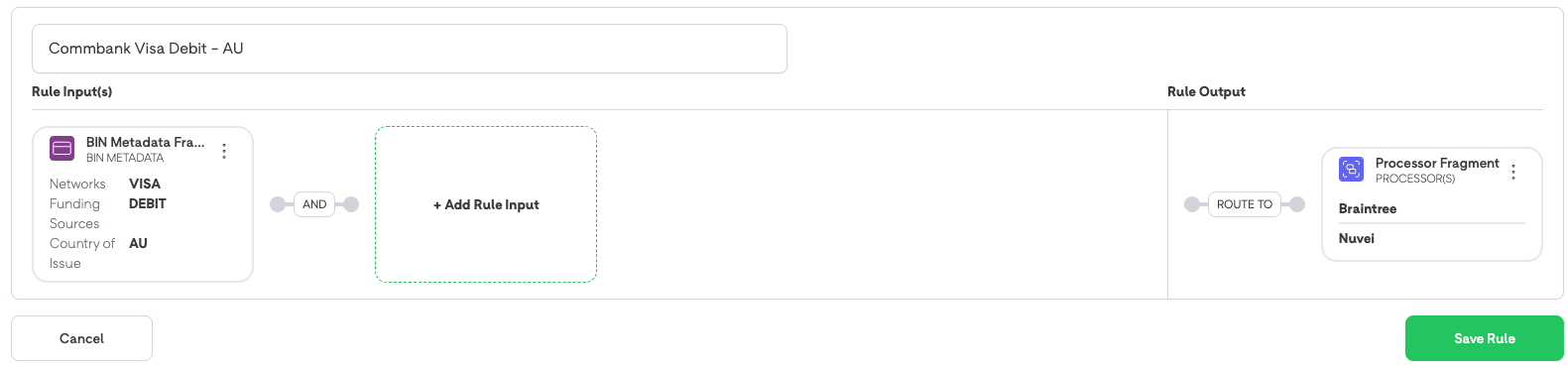
- Name the rule CommBank Visa Debit - AU.
- In Rule Configuration, select Add Rule Input > BIN Metadata and set the Issuing country to AU. Set the Network to Visa and the Funding Source to Debit.
- Select Create Fragment.
- Select Add Rule Output.
- Select Processor Fragment, select PSP_A and PSP_B, then select Create Fragment.
- Select Save Rule.
- Select Reorder Rules and move this rule to the top of the list.
What happens when a transaction is attempted:
- All Visa Debit cards from Australia are routed to PSP_A, the most cost effective processor.
- If PSP_A fails, the transaction will be routed to PSP_B. The next transaction will try PSP_A.
Updated 4 months ago
Did this page help you?