
Bank2Bank
Learn about Bank2Bank, an alternative payment method by Walletdoc for South African bank transactions.
Bank2Bank is a payment method offered by Walletdoc that allows customers in South Africa to transact using their bank accounts.
Bank2Bank is only available via WalletDoc. You cannot use Bank2Bank with any other PSP.
You can use Bank2Bank as a Payment Method for:
| REST API | WebSDK | Hosted Payment Page | |
|---|---|---|---|
| Payments | ✅ Available | ⛔️ Unavailable | ⛔️ Unavailable |
| Split Auth & Capture | ⛔️ Unavailable | ⛔️ Unavailable | ⛔️ Unavailable |
| Payouts | ✅ Available | ⛔️ Unavailable | ⛔️ Unavailable |
| Refunds | ⛔️ Unavailable | ⛔️ Unavailable | ⛔️ Unavailable |
Payment
BR-DGE payments using the bank2bank payment instrument follow the BR-DGE redirect payment flow. BR-DGE returns a redirect URL in the payment request response, directing the customer to Walletdoc to provide bank details and authenticate with their bank. Walletdoc then transfers funds from the customer's bank to yours.
Transaction Statuses
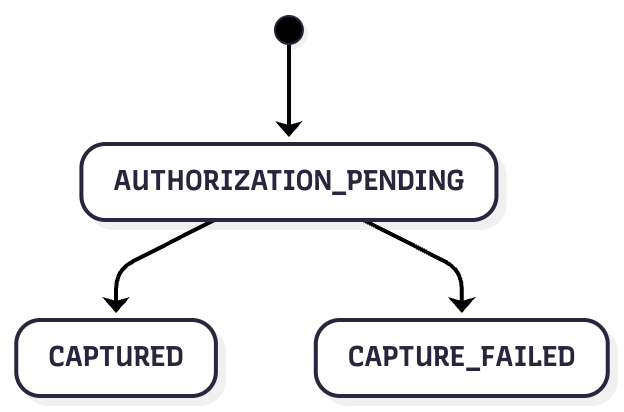
| BR-DGE Status | Description |
|---|---|
AUTHORIZATION_PENDING | The BR-DGE payment is AUTHORIZATION_PENDING while Walletdoc actions the payment |
CAPTURED | If Walletdoc successfully completes the payment, BR-DGE is notified and updates the status to CAPTURED |
CAPTURE_FAILED | If the Walletdoc transaction is unsuccessful, BR-DGE are notified and updates the status of the transaction to CAPTURE_FAILED |
Payment API Examples
To perform a payment using Bank2Bank you should send a request to the POST /v1/payments REST API endpoint, using a request body similar to the below.
The following examples contain only the minimum required to perform a successful payment using Bank2Bank. For a full view of all available API request fields please view the Create a Payment REST API endpoint documentation directly.
Omitting a
bankNameand associatedidentifierobject will allow the customer to select their chosen financial institution on the payment page, once redirected to theaction.data.url.Inclusion of a
bankNamewill lock the payment to that specific financial institution, and the customer will not be able to select a different institution to pay with.
Payment Request
{
    "amount": 10000,
    "currencyCode": "ZAR",
    "customerOrderCode": "59443f39-4bb6-48c5-842c-594a2498a2f2",
    "orderDescription":"Taxi Fare",
    "paymentInstrument": {
        "type": "bank2bank",
        "returnUrl":"https://example.com"
    }
}
{
"amount": 10000,
"currencyCode": "ZAR",
"customerOrderCode": "59443f39-4bb6-48c5-842c-594a2498a2f2",
"orderDescription": "Taxi Fare",
"paymentInstrument": {
"type": "bank2bank",
"returnUrl": "https://example.com",
"bankName":"capitec",
"identifier":{
"type":"national_id",
"value":"2601010201342"
}
}
}Specifying a
bankNamein the request is currently only supported for Absa and Capitec
Response
Successful creation of a payment with Walletdoc will result in a response that looks similar to the following:
{
    "code": "2101",
    "message": "Pending",
    "id": "69380aa70df339f6c14439d28115191d",
    "paymentId": "6449b5ea-358d-40a3-b2e5-441c4726a46e",
    "amount": 10000,
    "currencyCode": "ZAR",
    "actionRequired": true,
    "action": {
        "type": "REDIRECT",
        "paymentId": "6449b5ea-358d-40a3-b2e5-441c4726a46e",
        "data": {
            "url": "https://www.walletdoc.tech/initiatePayment?id=82ac894119b145699a7c506adb108445",
            "providerTransactionId": "82ac894119b145699a7c506adb108445"
        }
    },
    "psp": {
        "name": "WalletDoc",
        "transactionId": "82ac894119b145699a7c506adb108445"
    },
    "pspId": "WALLETDOC",
    "customerOrderCode": "59443f39-4bb6-48c5-842c-594a2498a2f2"
}
Additional Information
Below is an outline of any Bank2Bank specific information you should know:
| Type | Notes |
|---|---|
Paying with bankName | When using a bankName, you must also provide an identifier object to BR-DGE. This allows the payer's bank to identify their customer, and authenticate them. |
Payouts
BR-DGE payouts using the bank2bank payment instrument follow an asynchronous flow. You send the customers Bank details to BR-DGE and they are forwarded to Walletdoc for processing. Once a request is accepted, the payment remains pending until Walletdoc confirms whether the payout has been successful.
Transaction Statuses
Walletdoc Payouts will follow the standard asynchronous transaction status flow. All Payouts initially enter a PENDING status, following processing of the transaction with Walletdoc, the BR-DGE Payout will then enter either APPROVED or DECLINED based on the result from Walletdoc.
As payout updates are managed asynchronously. Walletdoc will notify BR-DGE of the result once they have completed processing, and we will update the status of the transaction within the BR-DGE system immediately upon receipt of a notification from Walletdoc. If you are subscribed to BR-DGE Notifications you will also receive an update from us once the transaction status has changed.
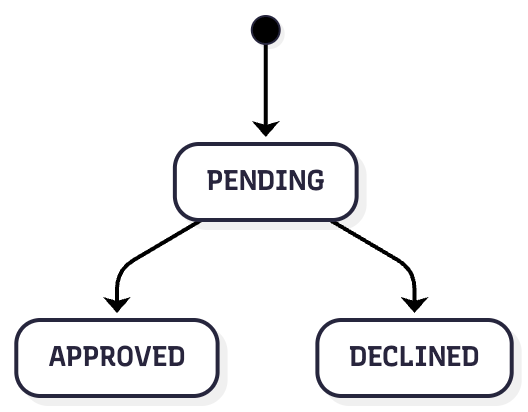
| BR-DGE Status | Description |
|---|---|
PENDING | The BR-DGE payout is PENDING while Walletdoc processes the payout |
APPROVED | Walletdoc successfully completes the payout request, BR-DGE is notified and updates the status to APPROVED |
DECLINED | Walletdoc is unsuccessful, BR-DGE is notified and updates the status to DECLINED |
Payout API Examples
To perform a payout using Bank2Bank you should send a request to the POST /v1/payouts REST API endpoint using a request body similar to the below.
The following example is the minimum required to perform a successful payout using Bank2Bank. For a full view of all available API request fields please view the Create a Payout REST API endpoint documentation directly.
Request
{
    "psp": "WalletDoc",
    "amount": 10000,
    "currencyCode": "ZAR",
    "reference": "a103a0af-e19c-4458-95f6-34169e0d52b6",
    "recipient": {
        "firstName": "John",
        "lastName": "Smith"
    },
    "paymentInstrument": {
        "type": "bank2bank",
        "bankId": "TYME",
        "accountNumber": "1234567890",
        "branchCode": "678910",
        "accountName":"Current Account"
    }
}
Response
{
    "code": "2101",
    "id": "693820a2f878d4ec4e575157d81cd559",
    "message": "Pending",
    "paymentId": "64dbf3e9-d991-4171-a6dd-e3f4b41b3dd4",
    "psp": {
        "name": "WalletDoc",
        "transactionId": "de5fe738-2eb8-4ad9-9688-06bd3b595567"
    },
    "amount": 10000,
    "currencyCode": "ZAR"
}
Payout Bank IDs
When making a payout with Bank2Bank you need to provide the correct bank ID value for the customers bank.
The paymentInstrument.bankId field should contain the Walletdoc identifier for the specific bank or financial institution. The table below contains the current bankId values that are supported.
| Bank | bankId Value |
|---|---|
| Absa | ABSA |
| African Bank | ABIL |
| Albaraka Bank | ALBA |
| Bidvest | BIDV |
| Capitec | CAPI |
| Discovery Bank | DISC |
| FNB | FNB |
| Finbond Mutual Bank | FINB |
| HBZ Bank Limited | HBZ1 |
| Investec | INVB |
| Nedbank | NEDB |
| SASFIN Bank | SASF |
| Standard Bank | STD |
| Standard Charter Bank | SCBS |
| Tyme Digital | TYME |
| Ubank | UBNK |
Walletdoc Status Mapping
When handling a Bank2Bank transaction BR-DGE will normalise the response code from Walletdoc into our own transaction status, to give you a standardised way of managing transactions statuses.
The following table describes how different Walletdoc transaction statuses are mapped to BR-DGE transactions statuses.
| Walletdoc Status | BR-DGE Status | Transaction Type |
|---|---|---|
ready_to_process | AUTHORIZATION_PENDING | Payment |
failed | CAPTURE_FAILED | Payment |
successful | CAPTURED | Payment |
cancelled | CAPTURE_FAILED | Payment |
created | PENDING | Payout |
succeeded | APPROVED | Payout |
failed | DECLINED | Payout |
Onboarding & Support
To enable Bank2Bank on your BR-DGE retail channels, please get in contact with support.
Updated 9 months ago