
OTT
OTT are a South African alternative payment method provider. They provide a series of payment options for merchants operating in South Africa, including creating and redeeming vouchers, and bank-to-bank transfers. electronic funds transfers.
You can use OTT as a Payment Method for:
| REST API | WebSDK | Hosted Payment Page | |
|---|---|---|---|
| Payments | ✅ Available | ⛔️ Unavailable | ⛔️ Unavailable |
| Split Auth & Capture | ⛔️ Unavailable | ⛔️ Unavailable | ⛔️ Unavailable |
| Payouts | ✅ Available | ⛔️ Unavailable | ⛔️ Unavailable |
| Refunds | ⛔️ Unavailable | ⛔️ Unavailable | ⛔️ Unavailable |
Payment
The BR-DGE ottVoucher Payment Instrument is used to redeem OTT vouchers. BR-DGE takes the OTT pin and sends it to OTT to redeem.
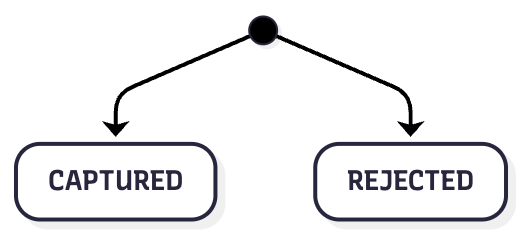
The outcome of a voucher redemption is either CAPTURED or REJECTED.
Transaction Status Flow
| BR-DGE Status | Description |
|---|---|
CAPTURED | If the voucher is successfully redeemed, then the BR-DGE payment status will be set to CAPTURED. |
REJECTED | If the voucher could not be redeemed, the BR-DGE payment will be updated with a REJECTED status. |
Payment API Examples
OTT Voucher Redemption
When making a payment request with an OTT voucher code, you can set the amount to 0. Doing so will redeem the full value of the voucher. The amount that is redeemed from the voucher, when setting the request amount to 0, will be returned to you in the amount field of the API response.
Any other positive integer value in the amount field will result in that amount, in the given currency, being redeemed from the voucher.
If you redeem an amount less than the voucher's value, the remaining balance will be stored in the customer's OTT Vault. They will be notified of this balance via an SMS, which will include a link they can use to generate a new voucher using the balance in their vault.
Request
To create an OTT payment, you need to send a request similar to the following to the BR-DGE POST /v1/payments endpoint.
The following examples contain only the minimum required to perform a successful payment using OTT. For a full view of all available API request fields, please view the Create a Payment REST API endpoint documentation directly.
{
    "merchantTransactionId": "ff163246-eb94-4763-9a2a-f5d6d48b026e",
    "amount": 0,
    "customerOrderCode": "ff163246-eb94-4763-9a2a-f5d6d48b026e",
    "orderDescription": "Taxi fare",
    "channel": "ios",
    "currencyCode": "ZAR",
    "paymentInstrument": {
        "type": "ottVoucher",
        "pin": "607276415871",
        "mobile": "+27721234567"
    }
}
Response
You should expect to receive a response similar to the one below, indicating whether the voucher redemption was successful.
{
    "code": "1000",
    "message": "Approved",
    "id": "691ca00b78759f29aa82ec4597b2d512",
    "paymentId": "8f48a327-e043-4e91-ab07-e2d645a95c84",
    "amount": 5000,
    "currencyCode": "ZAR",
    "actionRequired": false,
    "psp": {
        "name": "OTT Mobile",
        "transactionId": "1759676"
    },
    "pspId": "OTT",
    "customerOrderCode": "ff163246-eb94-4763-9a2a-f5d6d48b026e",
    "merchantTransactionId": "ff163246-eb94-4763-9a2a-f5d6d48b026e"
}
Payouts
BR-DGE offer 3 different types of OTT payouts:
- OTT's Cardless service, which allows customers to redeem a code at an ATM to receive their money
- OTT's Value-Added Services, where customers can receive vouchers with other vendors (such as gift cards or PlayStation Network codes)
- Bank-to-bank (EFT), for customers who want to get the payout transferred directly to their bank account
The payout method used is defined by the provider name in the Create a Payout REST API endpoint. For a provider to be active, they must first be configured in the OTT Portal for your merchant account.
Cardless Service and Value-Added Services
Cardless Service and Value-Added Services payouts using the ottPayout payment instrument follow a synchronous flow. You send the payout details to BR-DGE, and they are forwarded to OTT for processing. Once a request is successful, OTT returns the voucher details, and you receive these in the REST response.
API Examples
To perform a payout using OTT Payouts, you should send a request to the POST /v1/payouts REST API endpoint using a request body similar to the one below.
The following example is the minimum required to perform a successful payout using OTT Payouts. For a full list of available API request fields, please refer to the Create a Payout documentation.
Request (Cardless service / Value-added services)
{
    "psp": "OTT",
    "amount": 900,
    "currencyCode": "ZAR",
    "reference": "42a1c9e4-7b8f-4d6e-9282-ed27fe9fedby",
    "purpose": "leisure",
    "recipient": {
        "firstName": "John",
        "lastName": "Doe",
        "email": "[email protected]",
        "phoneNumber": "+27721234567",
        "documentType": "RSAID",
        "documentId": "9103215388086",
        "documentIssuer": "ZA"
    },
    "paymentInstrument": {
        "type": "ottPayout",
        "providerName": "OTT Voucher"
    }
}
Response
{
  "code": 1000,
  "message": "Approved",
  "id": "731Ahdfepal24",
  "paymentId": "42a1c9e4-7b8f-4d6e-9282-ed27fe9fedby",
  "status": "APPROVED",
  "psp": {
    "name": "ottPayout",
    "transactionId": "#ottResponse.paymentReference",
    "additionalInfo": {
        "type": "ottPayout",
        "serialNumber": "300003849616",
        "pin": "464828964739"
    }
  }
}
Bank-to-Bank Payouts
Bank-to-Bank payouts using the ottPayout payment instrument follow an asynchronous flow. You send the customers' bank details to BR-DGE, and the details are forwarded to OTT for processing. Once a request is accepted, the payment remains pending until OTT confirms whether the payout has been successful.
Transaction Statuses
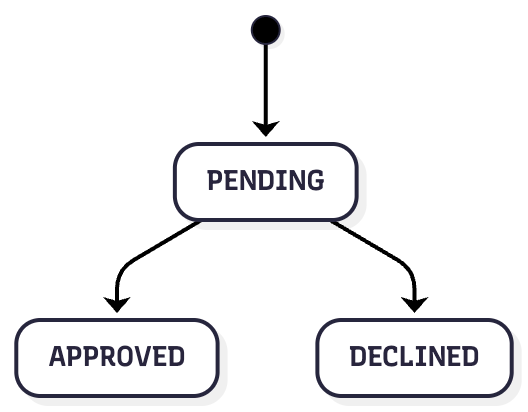
OTT Payouts will follow the standard asynchronous transaction status flow. All Payouts initially enter a PENDING status. Following processing of the transaction with OTT, the BR-DGE Payout will be marked as APPROVED or DECLINED based on the result from OTT.
As payout updates are managed asynchronously, OTT will notify BR-DGE of the result once it has completed processing. Upon receipt of the notification from OTT, BR-DGE will then update the transaction status in the system.
If you are subscribed to BR-DGE Notifications, you will also receive an update from us when the transaction status changes.
| BR-DGE Status | Description |
|---|---|
PENDING | The BR-DGE payout is PENDING while OTT processes the payout |
| APPROVED | OTT successfully completes the payout request, BR-DGE is notified and updates the status to APPROVED |
| DECLINED | Payout is unsuccessful, BR-DGE is notified and updates the status to DECLINED |
API Examples
To perform a payout using OTT Payouts, you should send a request to the POST /v1/payouts endpoint using a request body similar to the one below.
The following example is the minimum required to perform a successful payout using OTT Payouts. For a full view of all available API request fields, please view the Create a Payout endpoint documentation directly.
{
    "psp": "OTT",
    "amount": 900,
    "currencyCode": "ZAR",
    "reference": "42a1c9e4-7b8f-4d6e-9282-ed27fe9fedby",
    "purpose": "leisure",
    "recipient": {
        "firstName": "John",
        "lastName": "Doe",
        "email": "[email protected]",
        "phoneNumber": "+27721234567",
        "documentType": "RSAID",
        "documentId": "9103215388086",
        "documentIssuer": "ZA",
        "gender": "male",
        "dateOfBirth": "1986-01-01"
    },
    "paymentInstrument": {
        "type": "ottPayout",
        "providerName": "Bank EFT",
        "bankDetails": {
            "bankDetailsFormat": "ZA",
            "accountNumber": "1352184990",
            "accountName": "John Doe",
            "branchName": "Main Branch",
            "branchCode": "198765"
        }
    }
}{
"code": 2101,
"message": "Pending Transaction",
"id": "731Ahdfepal24",
"paymentId": "42a1c9e4-7b8f-4d6e-9282-ed27fe9fedby",
"status": "PENDING",
"psp": {
"name": "ottPayout",
"transactionId": "#ottResponse.paymentReference"
}
}Onboarding & Support
To enable OTT on your BR-DGE retail channels, please get in contact with support.
Updated 7 months ago