
Click to Pay frontend integration
This section covers embedding Click to Pay (STP) on a checkout page using the BR-DGE Web SDK.
It assumes you have an active BR-DGE integration and can generate a client access token. If you have not set up the Web SDK yet, read the BR-DGE Web SDK introduction first.
EMVCo GuidelinesFor visual compliance, badge placement. and customer experience best practices, refer to the EMVCo Click to Pay CX Guidelines.
Customer journey flow and orchestration
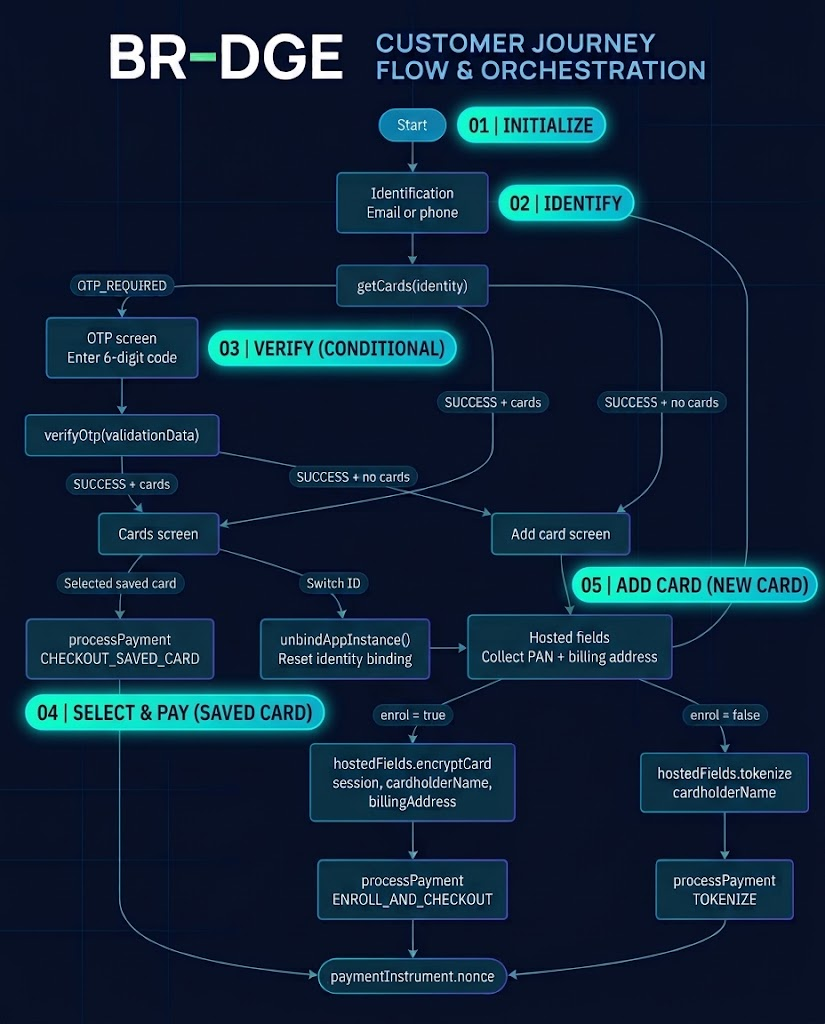
Each step in the Click to Pay checkout flow maps to a Web SDK call:
-
Initialise: Start the session with an amount and currency.
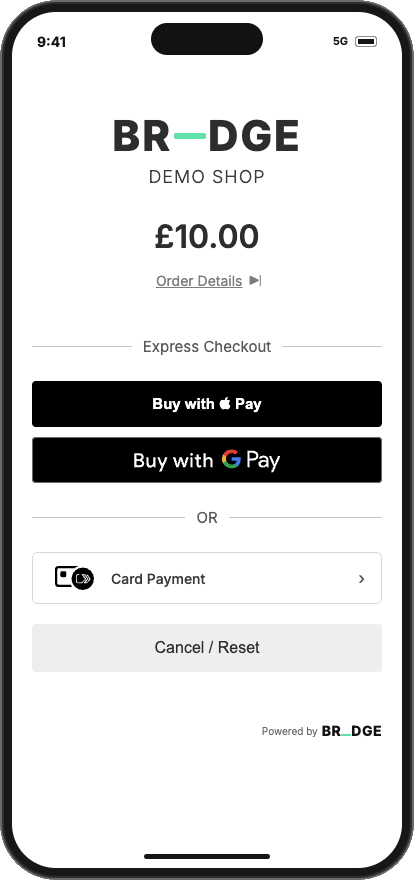
Before you can initialise the click to pay session, you first must create a click to pay instance. Once created you can initialise the session.
// Create a Click to Pay instance
const ctpClient = await comcarde.visaClickToPay.create({
  client: clientInstance,
  authorization: '<merchant-client-bearer-token>'
  });
const cartAmount = '10.00';
const cartCurrency = 'GBP';
// Initialise CTP before the user clicks anything.
await ctpClient.initializeClickToPay({
  amount: cartAmount,
  currencyCode: cartCurrency
  });
- Identify: Look up the customer by email or mobile number (
getCards).
// identityType must be 'EMAIL_ADDRESS' or 'MOBILE_PHONE_NUMBER'.
const identity = email
  ? { identityValue: email, identityType: 'EMAIL_ADDRESS' }
  : { identityValue: phone, identityType: 'MOBILE_PHONE_NUMBER' };
try {
const result = await ctpClient.getCards(identity);-
Verify (Conditional): If the device is unrecognised, prompt for a one-time passcode (
verifyOtp).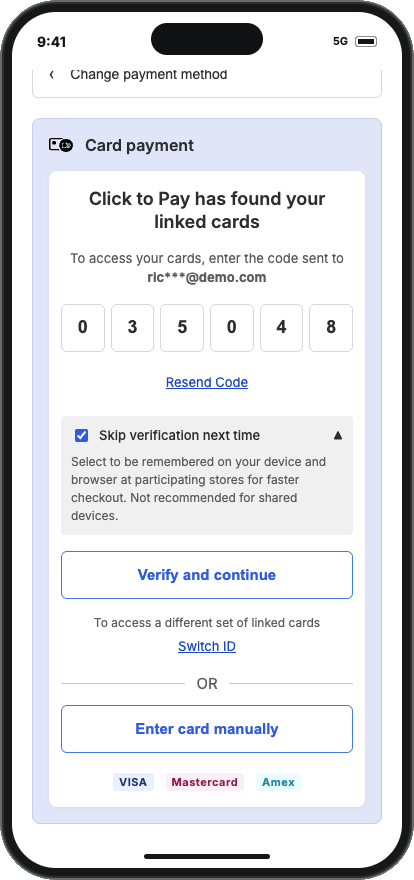
try {
  const result = await ctpClient.verifyOtp({ validationData: code });
  // You will want to handle if the OTP is successful and no cards are returned as
  // well as if cards are returned.
  }
catch (err) {
  fail(err);
}-
Select and Pay (Saved Card): Complete the checkout using an existing card ID (
processPayment).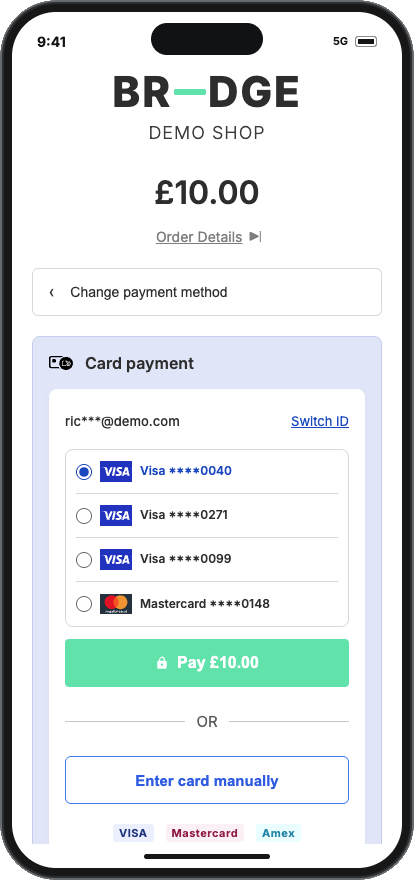
When using processPayment with a new card, supply the action, cardId of the selected card, and complianceResource details if the customer selected to skip verification for future Click to Pay payments.
const checkoutSavedCardPayload = {
  action: 'CHECKOUT_SAVED_CARD',
  cardId: selectedCardId,
  includeAuthenticationDetails: true
  };
if (skipVerification) {
  checkoutSavedCardPayload.complianceSettings = {
    complianceResources: [
      {
        complianceType: 'REMEMBER_ME',
        uri: window.location.origin + '/privacy'
      }
    ]
  };
}
try {
  const result = await ctpClient.processPayment(checkoutSavedCardPayload);
}
catch (err) {
        fail(err);
}-
Add Card (New Card): Capture, encrypt, and enrol new cards using BR-DGE Hosted Fields.
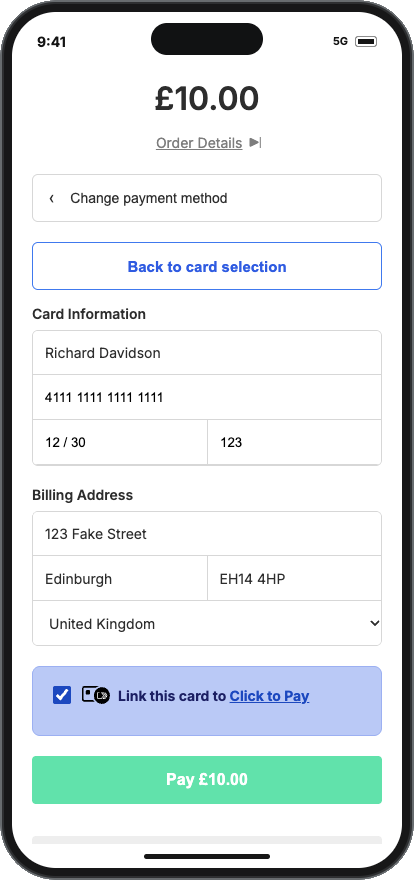
When adding a new card you need to use BR-DGE’s hosted fields to capture the card details. You also need to supply the billingAddress, including first and last name.
Before calling processPayment, you first need to successfully encrypt the card details for Click to Pay to receive securely.
When calling processPayment, in addition to the encrypted card data and other details, you need to provide a complianceResource item of type PRIVACY_POLICY.
Terms and Privacy notice for Click to PayAs part of the enrollment, include links to Terms of Service and Global Privacy Notice in your UI.
// ----- Add-card with Hosted Fields -----------------------------------
let hostedFields = null;
async function mountHostedFields() {
  if (hostedFields) { return; }
  hostedFields = await comcarde.hostedFields.create({
  client: clientInstance,
  fields: {
    number: { selector: '#card-number',  placeholder: 'Card number' },
    expirationDate: { selector: '#card-expiry',  placeholder: 'MM/YY' },
    cvv: { selector: '#card-cvv',     placeholder: 'CVV' }
    }
  });
}
document.getElementById('pay-new').addEventListener('click', async function () {
  const enrol = document.getElementById('enrol').checked;
  const cardholderName = document.getElementById('cardholder-name').value.trim();
  const billingAddress = {
    address1: document.getElementById('billing-address').value.trim(),
    country: document.getElementById('billing-country').value || 'GB',
    county: document.getElementById('billing-county').value.trim(),
    firstName: document.getElementById('enrol-first-name').value.trim() || 'Firstname',
    lastName: document.getElementById('enrol-last-name').value.trim() || 'Surname',
    postcode: document.getElementById('billing-postcode').value.trim(),
    town: document.getElementById('billing-city').value.trim()
    };
  try {
    if (enrol) {
    // ENROLL_AND_CHECKOUT: the iframe encrypts the PAN and returns
    // a JWE. The raw card number never leaves the iframe.
      const encrypted = await hostedFields.encryptCard({
        session: ctpClient.getSessionJwt(),
        cardholderName: cardholderName,
        billingAddress: billingAddress
      });
      const emailAddress = document.getElementById('email').value.trim();
      const firstName = document.getElementById('enrol-first-name').value.trim() || 'Firstname';
      const lastName = document.getElementById('enrol-last-name').value.trim() || 'Surname';
      const rawPhone = (document.getElementById('enrol-phone').value || '').replace(/\s+/g, '');
      const result = await ctpClient.processPayment({
        action: 'ENROLL_AND_CHECKOUT',
        cardId: null,
        enrol: true,
        includeAuthenticationDetails: true,
        encryptedCard: encrypted.encryptedCard,
        complianceSettings: {
          complianceResources: [
            {
              complianceType: 'PRIVACY_POLICY',
              uri: 'https://www.visa.com/en-us/legal/global-privacy-notice'
            },
              {
              // Only include if the customer has opted to skip verification
                complianceType: 'REMEMBER_ME',
                uri: window.location.origin + '/privacy'
              }
            ]
          },
          consumer: {
            emailAddress: emailAddress,
            consumerIdentity: {
              identityProvider: 'SRC',
              identityValue: emailAddress,
              identityType: 'EMAIL_ADDRESS'
            },
            mobileNumber: {
              countryCode: countryCode,
              phoneNumber: phoneNumber
            },
            countryCode: 'GB',
            locale: 'en',
            firstName: firstName,
            lastName: lastName,
            fullName: firstName + ' ' + lastName
            }
        });
    }
    else {
      // TOKENIZE: pay once without saving the card to Click to Pay.
      const tokenizePayload = await hostedFields.tokenize({
        cardholderName: cardholderName
        });
      const result = await ctpClient.processPayment({
        action: 'TOKENIZE',
        hostedFieldsToken: tokenizePayload.token
      });
    }
  }
  catch (err) {
    fail(err);
  }
});
Device recognition ("Remember me")
Click to Pay can bind a consumer's device so future checkouts bypass the OTP step. When bound, getCards() returns SUCCESS with the stored cards rather than triggering OTP_REQUIRED.
UI placement rules
- The Remember me checkbox must appear on the OTP/verification screen, labelled as for example, Skip verification next time.
- On trusted devices where the user is already recognised, the OTP screen is bypassed completely.
Transmission rules
- Where it is sent: The consent flag is passed inside
complianceSettingson the checkout action(processPayment),not during identity verification. - Important: Do not include
complianceSettingsor device-binding flags in theverifyOtp()call. The underlying SDK payload rejects verification calls containing compliance objects.
// Attached to processPayment payload when opting into device binding:
"complianceSettings": {
  "complianceResources": [
    {
      "complianceType": "REMEMBER_ME",
      "uri": "[https://yourdomain.com/privacy-policy](https://yourdomain.com/privacy-policy)"
    }
  ]
}
Allowed complianceType values: PRIVACY_POLICY, REMEMBER_ME, and TERMS_AND_CONDITIONS.
Switch ID
To switch consumer identity, call ctpClient.unbindAppInstance() before looking up cards with a new email or mobile number.
The flow to switch ID is as follows:
- Clears local verified-user state.
- Call
unbindAppInstance()to detach the existing consumer identity from the browser session. - Re-runs
initializeClickToPay()with the new email or phone before callinggetCards()again.
Use this when the shopper wants to switch accounts or start over with a different identity on the same device.
Updating transaction data
Use ctpClient.updateTransactionData() to update the active session's amount, currency, email, or phone number:
await ctpClient.updateTransactionData({
  amount: '7.99',
  currencyCode: 'GBP',
  email: '[email protected]',
  phoneNumber: '+447712345689'
});
Authentication details (deciding whether to use 3-D Secure)
Click to Pay payments are not always 3-D authenticated; adding a new Visa card, for example, may not authenticate it. Pass includeAuthenticationDetails: true to processPayment() on CHECKOUT_SAVED_CARD or ENROLL_AND_CHECKOUT to receive result.authenticationDetails.
This is the ECI value from the card network's checkout response, passed through unmodified.
For a saved card, use the checkout payload built in section 2, preserving any existing compliance settings:
const result = await ctpClient.processPayment({
  ...checkoutSavedCardPayload,
  includeAuthenticationDetails: true
});
console.log(result.authenticationDetails);
For a new card, use the encrypted card, consumer information, and compliance settings already collected for enrollment:
const result = await ctpClient.processPayment({
  action: 'ENROLL_AND_CHECKOUT',
  enrol: true,
  encryptedCard,
  consumer,
  complianceSettings,
  includeAuthenticationDetails: true
});
console.log(result.authenticationDetails);
Scheme-specific ECI values
ECI values are scheme-specific. The network returns them unmodified and the SDK does not remap them. Read the row for the card's scheme, using card.brand from getCards() or the brand of the card being enrolled.
| Scheme | Authenticated | Attempted (stand-in) | Not performed |
|---|---|---|---|
| Visa | 05 | 06 | 07 |
| Mastercard | 02 | 01 | 00 |
Missing details and other checkout modes
- When requested but unavailable,
authenticationDetailsis null. This can happen when the network doesn't include the ECI value. - Treat a missing ECI as unknown, even when the object is present.
- Without
includeAuthenticationDetails, the result key is omitted entirely. TOKENIZEignores the flag.
Updated 3 days ago